Inspire Feed
Amazon Search and Filter helps customers quickly find relevant products through personalized recommendations and intuitive filters. Whether browsing for inspiration or shopping with intent, customers can narrow results and discover the right products faster.
Project:
Amazon Internship
Time:
12 weeks
Role:
UX Designer role
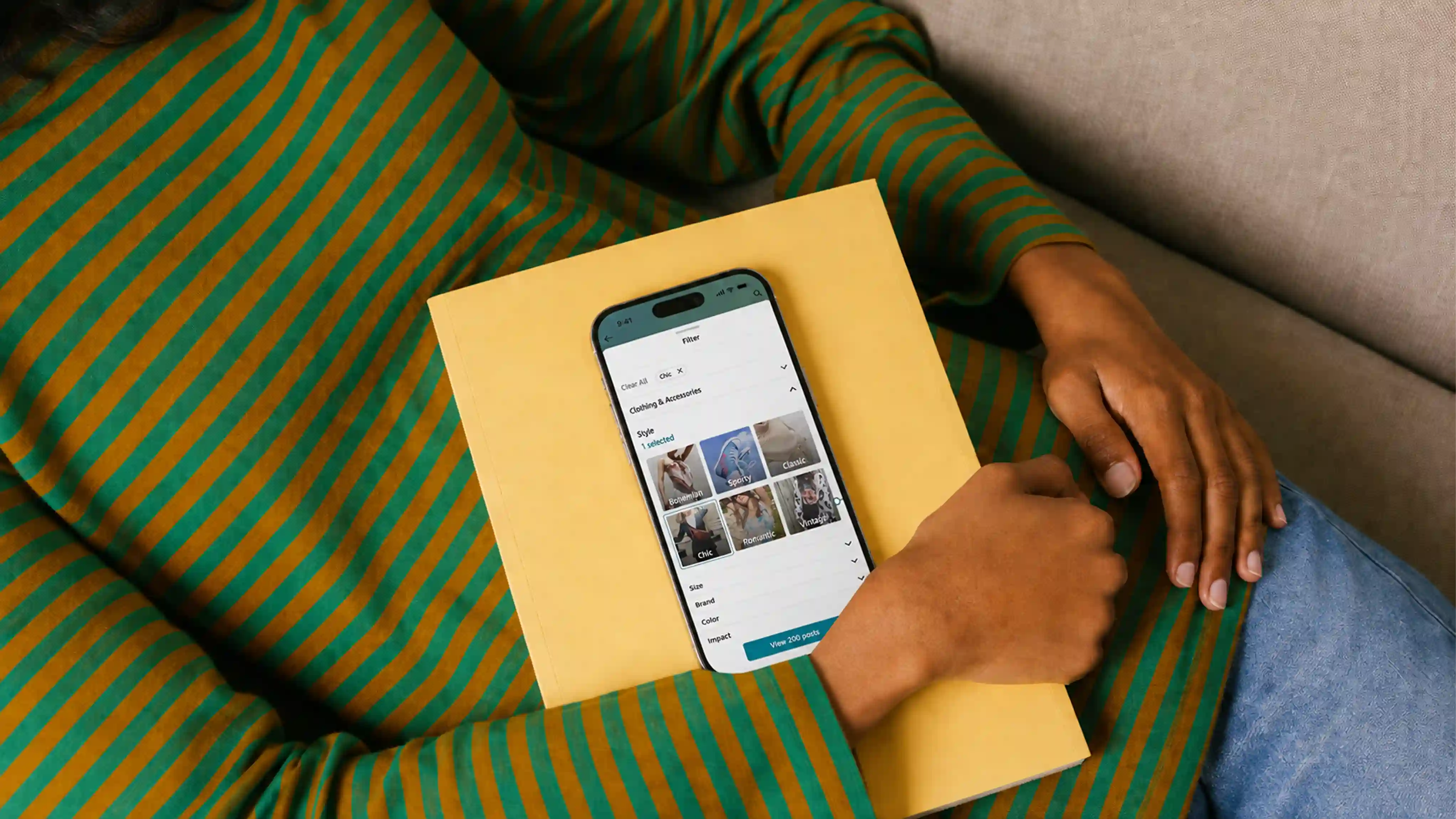
I began my career at Amazon as a UX Design Intern in the summer of 2020, and I returned as a full-time UX Designer in July 2021. During my 12-week internship, I worked on two projects: the Search and Filter CX for the #FounditonAmazon mobile experience and the 'Making Mobile Fun' project.
The Amazon Search and Filter for #FounditOnAmazon, a feed designed to show customers an endless stream of inspirational content, is designed to enhance the shopping experience for customers by providing personalized content recommendations and allowing them to easily refine their search results based on their interests and preferences. Whether they're looking for inspiration or know exactly what they want, our innovative tool helps them find exactly what they're looking for quickly. With an intuitive interface and powerful filtering options, customers can discover new products and save time by quickly narrowing down the results to the most relevant items. The 'Making Mobile Fun' project focused on adding fun micro-experiences to customers' shopping journeys on Amazon.
I would like to express my gratitude to my manager, Tyra Dumars, mentors Aileen Shin and Demetre Arges, and the rest of the Shopping Design team I worked with.
About #FoundItOnAmazon
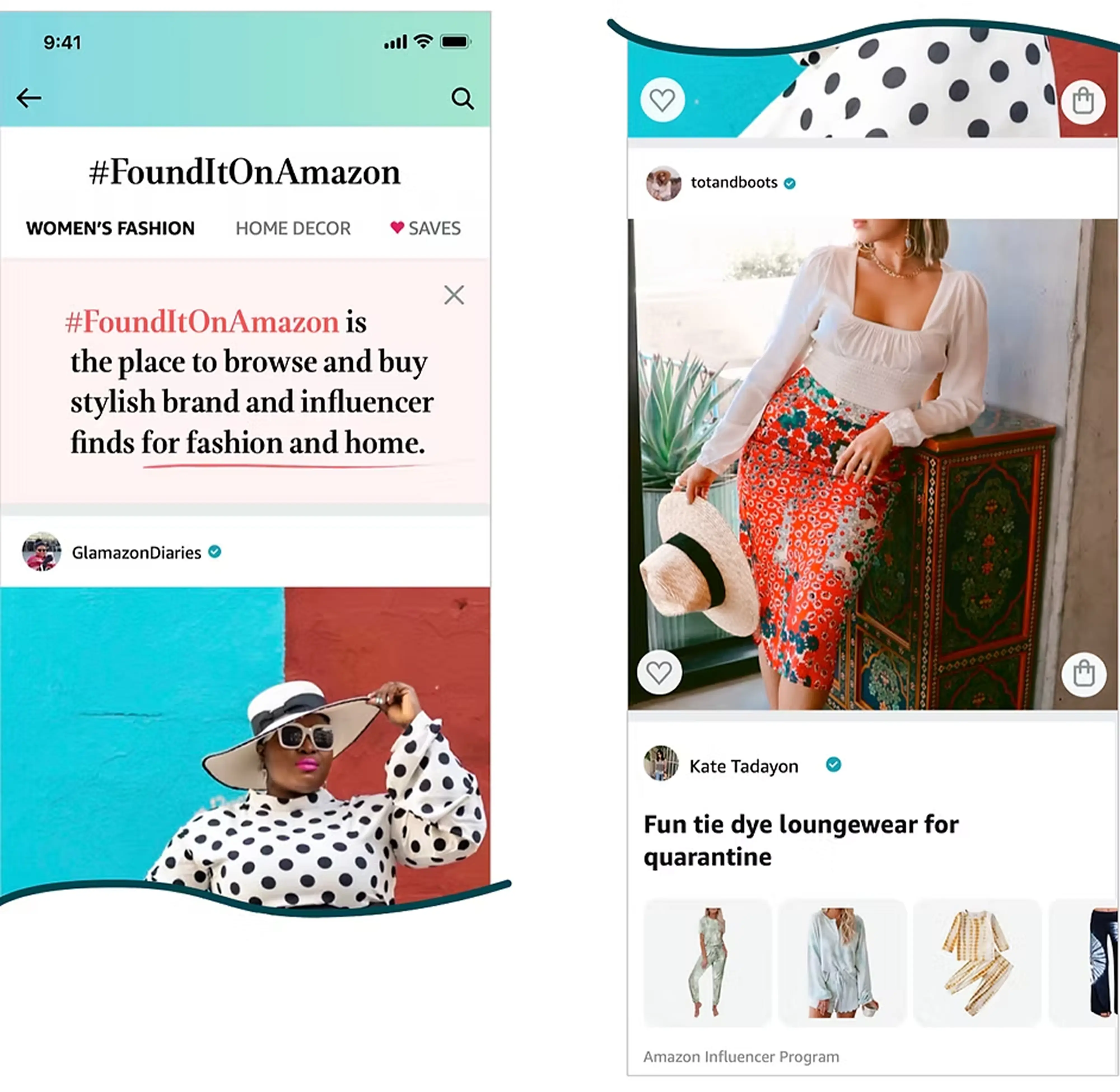
#FoundItOnAmazon is a browsing experience designed to show customers an endless stream of inspirational content.
It is a companion to Amazon's experience, designed to drive interaction and encourage serendipitous purchases. Customers see a stream of visually appealing product recommendations, trends, and unique finds. The platform features how influencers and users showcase products in context, with styling ideas for women’s fashion and transformation visuals for home decor. This approach adds surprise and helps customers visualize products in real-life scenarios.
Problem and benefits
Today, when a customer visits the #FoundItOnAmazon feed, there is no opportunity for them to narrow down feed content to their interests in general, nor is there an opportunity to narrow down the feed content to satisfy the need of that trip (e.g. I need to find a new black dress).
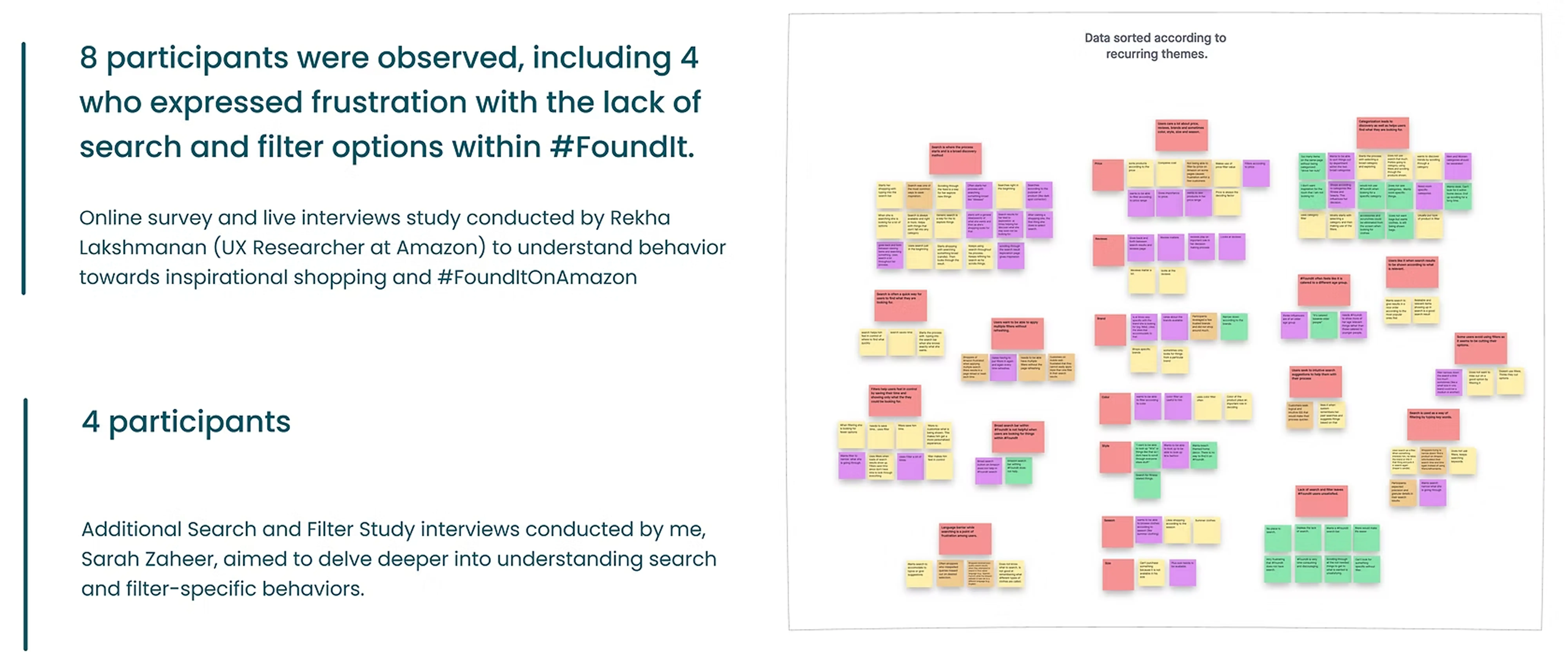
12 out of 18 participants have pointed out that this is a cause of their frustrations on #FoundItOnAmazon.
Customer benefit
Customers can use search and filter as a way to get inspiration, as well as find specific items by refining their search or/and applying filters.
Business benefit
Search and filter will enable exploration and filtering for customers. This would directly result in more repeat customer engagement with #Foundit and thus, increase traffic.
Success metrics
Reuse of search and filter.
Items selected or saved per search and filter.
Revisit rate of #Foundit.
Accuracy on search and filter results.
Competitive Analysis
Understanding how competitors use search and filtering to narrow down feed content to customers' interests.
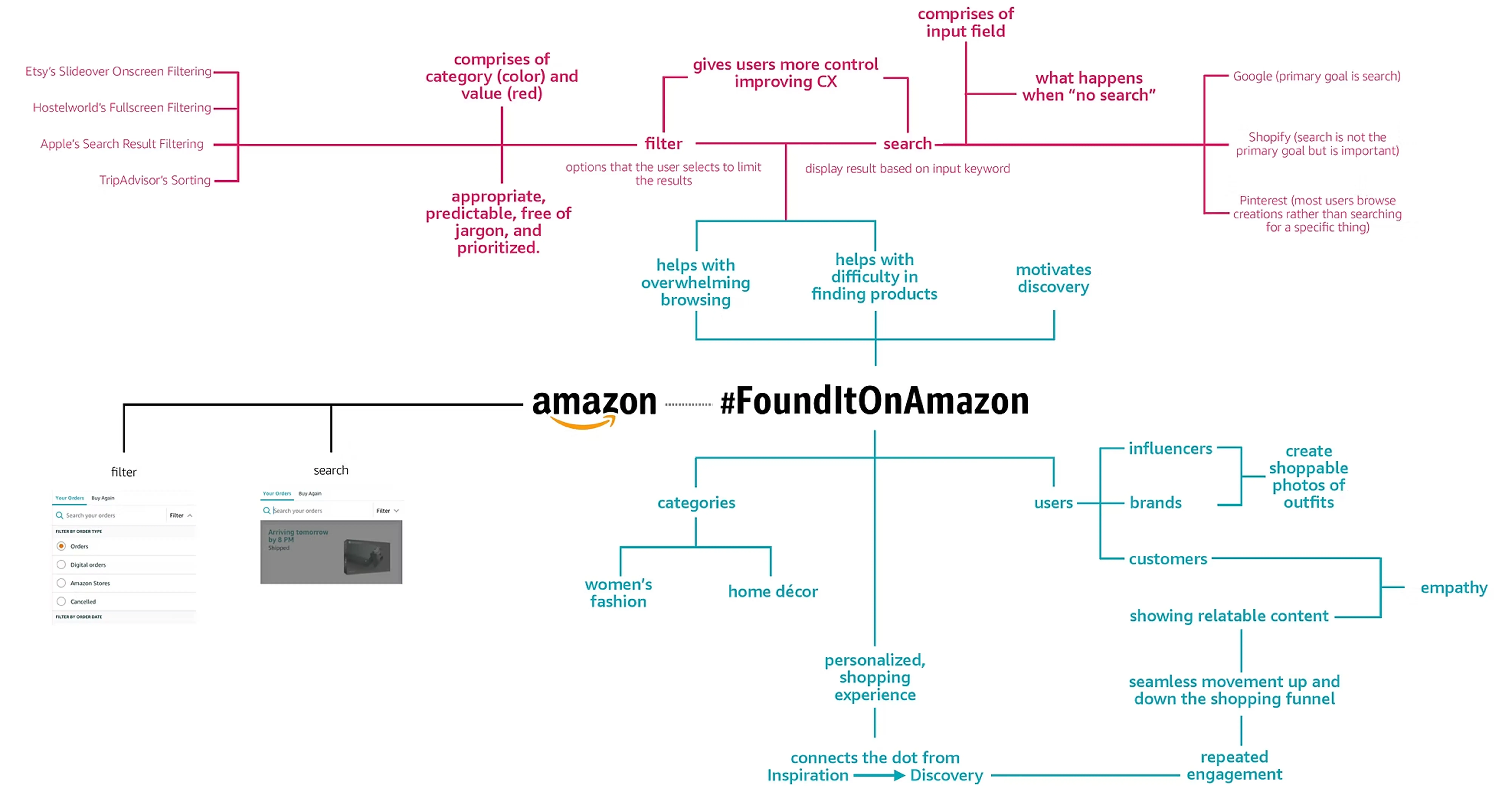
Pinterest: Focuses on discovery with related pins shown when an image is selected, prioritizing exploration over filters.
Depop: Combines visual category grids with balanced search and filtering, emphasizing exploration while keeping these tools accessible.
Dough: Offers diverse creative filters like “impact” and “community.”
Wayfair: Provides comprehensive search and filtering options, allowing easy control, multiple filters, and straightforward resets.
How might we help customers get inspiration as well as find specific items using search and filter on #FoundItOnAmazon?
User Research
To understand customers’ needs and frustrations on #FoundIt, explore how they feel about the lack of search and filter options and other specific search and filter behaviors. Additionally, identify potential opportunity areas.
Insights
Insight 1: Customers pivot between broad and focused discovery. They start with search and categories as a way to explore products, and then often use filter or refine search as a way to get granular results.
Insight 2: Customers gravitate towards highly visual experiences when browsing for inspiration. This helps them connect with the product as well as helping those with a language barrier.
Insight 3: Customers want to be shown content that is relevant to them. This helps them get a personalized experience as well as saving their time by not having to do additional research.
“I search for something generic and broad like shorts. I like getting a lot of options and going from there. I use filters especially when I have a lot of results ‘cause I don't have the time to go through everything” - (Dalal, 21, CA)
“English is my second language so I mostly don't know what things are called in English. That is why pictures help me a lot.” - (Shincheng, 20, CA)
“I'd lose trust if I look for one thing and something irrelevant shows up, like I don't want to see things that are unrelated.” - (Ronald, 34, CA)
Mind Map for Secondary Research
Current Customer Journey

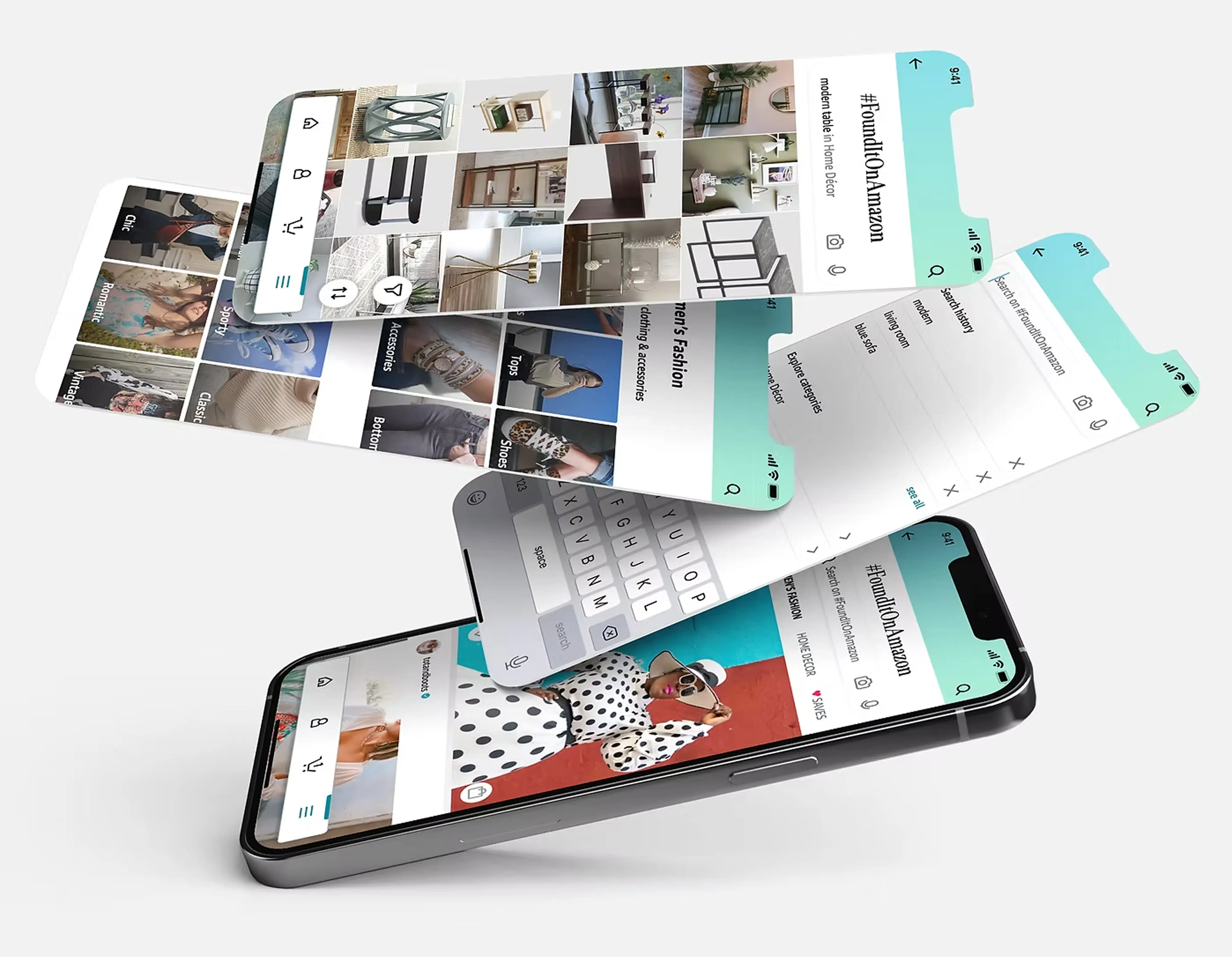
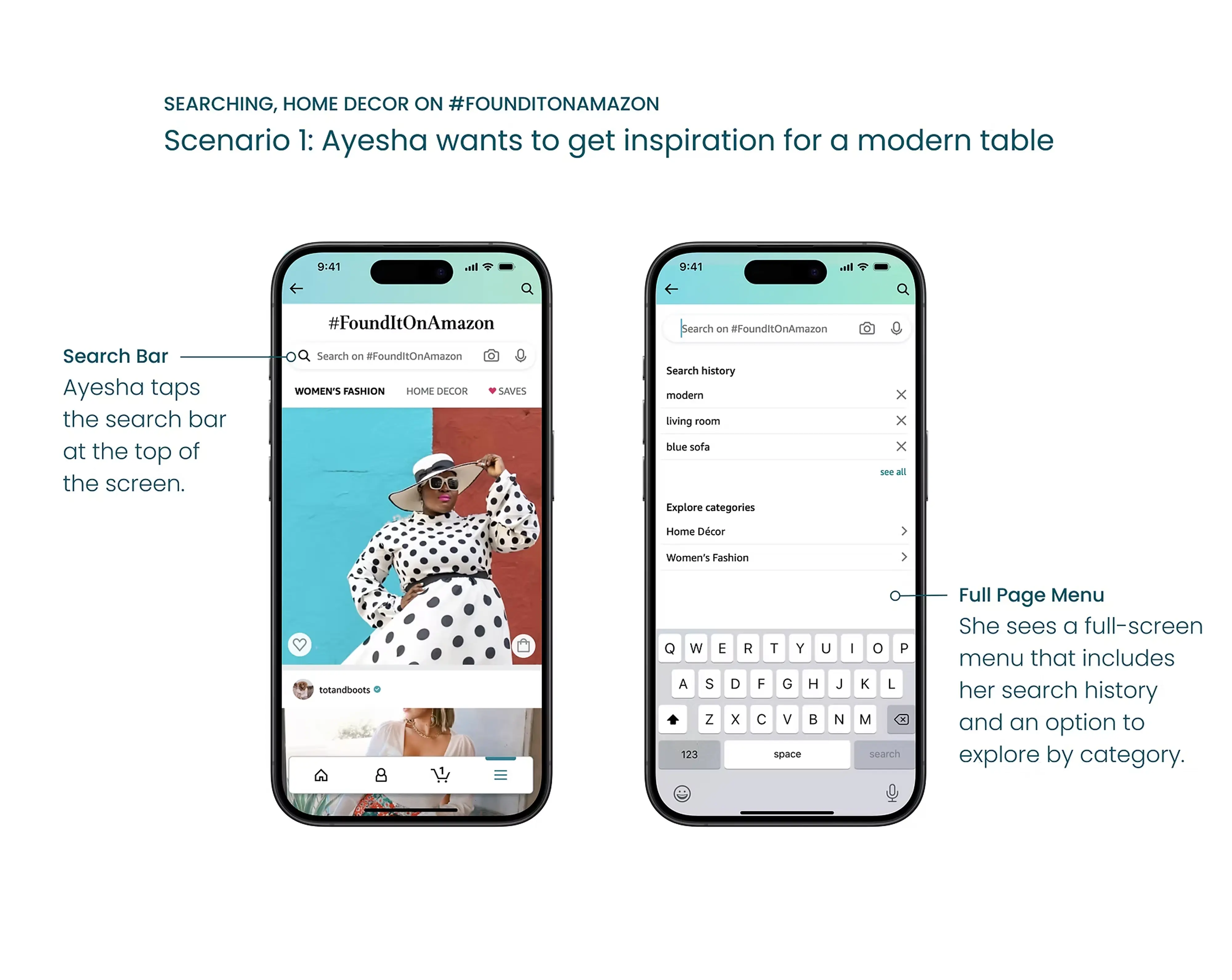
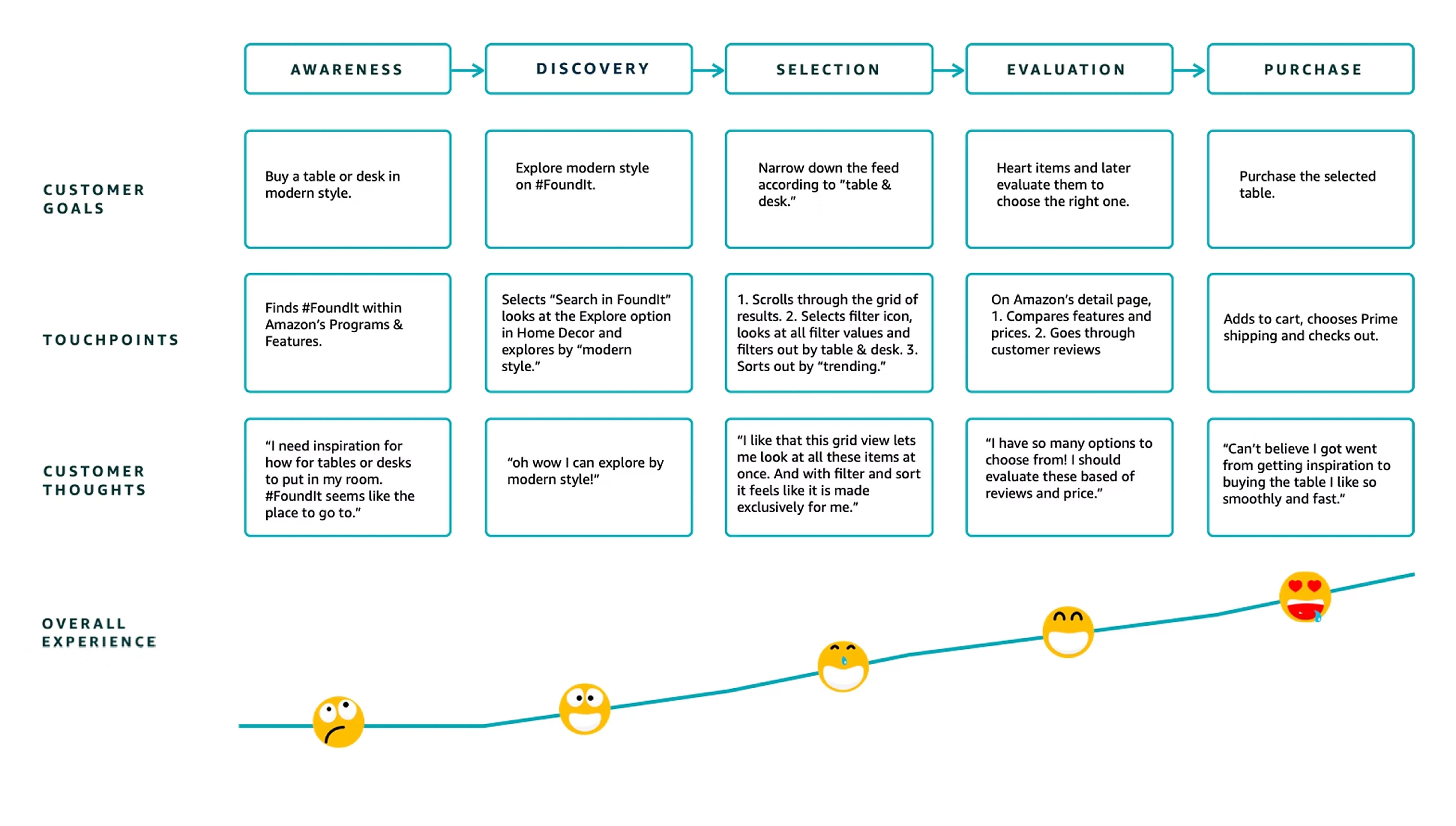
Get inspired with #FoundItOnAmazon; search and filter to find the best!

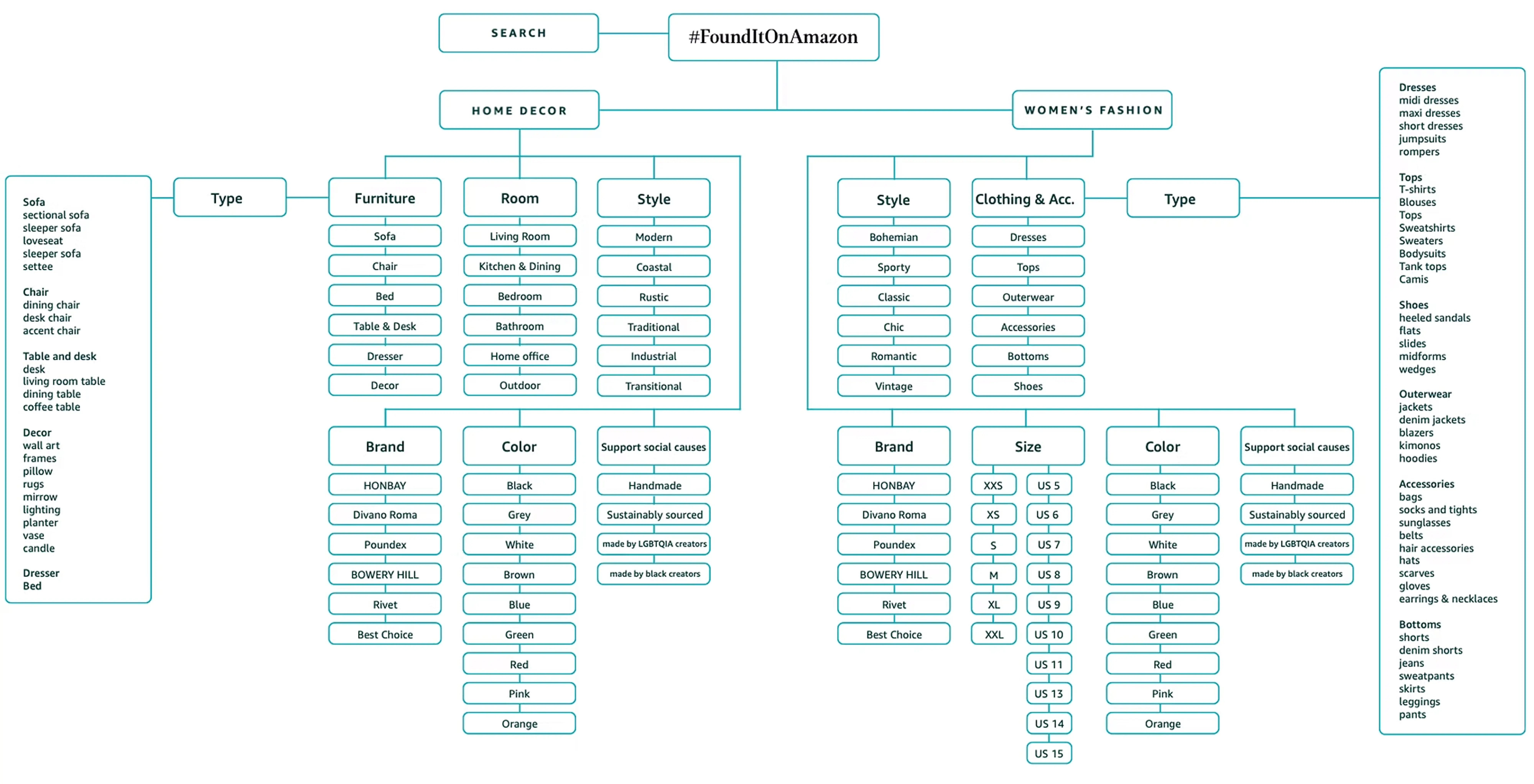
Information Architecture Map
User Testing Insights and Iterations
To learn the following about the prototyped search and filter features on #FoundIt, UT.com was used to put together a remote usability study and 10 participants were recruited for the same.
What are the usability issues that customers run into while searching, filtering, exploring by categories, or sorting?
Were the expectations of customers from search, explore, filter, and sort met?
Are customers able to recognize the various UI elements?
Does this allow exploration as well as help customers get granular with their results?
The hits
8 out of 10 participants found the search feature easy to use, appreciating the search bar location, predictive search, and search history.
Recognition of filter and sort buttons was difficult, but 7 out of 10 who found them used filters quickly and found them convenient.
Participants who explored by categories liked the categorization and image use.
All but one participant could distinguish between #FoundItOnAmazon’s search bar and the global Amazon search icon.
8 out of 10 participants expected and were pleased with the grid view of items, while 2 preferred a list of products with brand and price, similar to Amazon.
The misses
All 10 participants struggled to identify the filter and sort buttons due to their placement and unrecognizable icons.
3 participants valued relevant filter values, but 5 didn’t understand them, and 2 found them redundant, expecting relevant items by default.
2 participants wanted more specific subcategories within existing categories.
All 10 liked the filter value integration but preferred “support” over “impact” and suggested clearer wording for the values.
Recommendation
Redesign the filter and sort buttons and place them where they are easy to locate.
Set “relevance” as the default ranking for search and category results.
Add “furniture type” as a sub-category in the existing filter to provide more options.
Reword “impact” and consider how this can be incorporated into the existing framework.
Future Customer Journey
Making Mobile Fun
As part of my Amazon internship, I worked on a side project creating a fun mobile animation.
When customers pull down on the screen, they will encounter Amazie, the #FoundItOnAmazon mascot, who will comically struggle to escape from a box before emerging with newly refreshed items and updating the feed.
Each time the pull-to-refresh action is used, Amazie will be dressed in a different costume, such as a detective or pirate, adding an element of surprise and delight.
Additionally, various items will emerge from the box alongside Amazie, enhancing the visual interest and engagement.
This animation not only makes the refresh action more interactive and enjoyable but also clearly demonstrates the feature’s functionality, keeping users entertained and informed while the content is updated.


Reflection
Working on #FounditOnAmazon was an incredibly rewarding experience. This role involved working closely with various stakeholders, including product managers, software engineers, and designers, to develop effective solutions. I conducted extensive research and employed an iterative approach to design, while also addressing business constraints and launch requirements. Managing the project’s timeline was entirely self-driven, requiring me to establish and adhere to a detailed process and schedule. I am deeply grateful to my manager, Tyra Dumars, my mentors Aileen Shin and Demetre Arges, and the entire Shopping Design team for their invaluable support and guidance throughout this journey.
Citation:-
https://help.pinterest.com/en/articles/how-pinterest-works
https://www.depop.com
https://www.dough.co
https://www.wayfair.com
Amazon Design System

©2026 | Sarah Zaheer
R
TIME:
PST
Inspire Feed
Amazon Search and Filter helps customers quickly find relevant products through personalized recommendations and intuitive filters. Whether browsing for inspiration or shopping with intent, customers can narrow results and discover the right products faster.
Project:
Amazon Internship
Time:
12 weeks
Role:
UX Designer role
I began my career at Amazon as a UX Design Intern in the summer of 2020, and I returned as a full-time UX Designer in July 2021. During my 12-week internship, I worked on two projects: the Search and Filter CX for the #FounditonAmazon mobile experience and the 'Making Mobile Fun' project.
The Amazon Search and Filter for #FounditOnAmazon, a feed designed to show customers an endless stream of inspirational content, is designed to enhance the shopping experience for customers by providing personalized content recommendations and allowing them to easily refine their search results based on their interests and preferences. Whether they're looking for inspiration or know exactly what they want, our innovative tool helps them find exactly what they're looking for quickly. With an intuitive interface and powerful filtering options, customers can discover new products and save time by quickly narrowing down the results to the most relevant items. The 'Making Mobile Fun' project focused on adding fun micro-experiences to customers' shopping journeys on Amazon.
I would like to express my gratitude to my manager, Tyra Dumars, mentors Aileen Shin and Demetre Arges, and the rest of the Shopping Design team I worked with.
About #FoundItOnAmazon
#FoundItOnAmazon is a browsing experience designed to show customers an endless stream of inspirational content.
It is a companion to Amazon's experience, designed to drive interaction and encourage serendipitous purchases. Customers see a stream of visually appealing product recommendations, trends, and unique finds. The platform features how influencers and users showcase products in context, with styling ideas for women’s fashion and transformation visuals for home decor. This approach adds surprise and helps customers visualize products in real-life scenarios.
Problem and benefits
Today, when a customer visits the #FoundItOnAmazon feed, there is no opportunity for them to narrow down feed content to their interests in general, nor is there an opportunity to narrow down the feed content to satisfy the need of that trip (e.g. I need to find a new black dress).
12 out of 18 participants have pointed out that this is a cause of their frustrations on #FoundItOnAmazon.
Customer benefit
Customers can use search and filter as a way to get inspiration, as well as find specific items by refining their search or/and applying filters.
Business benefit
Search and filter will enable exploration and filtering for customers. This would directly result in more repeat customer engagement with #Foundit and thus, increase traffic.
Success metrics
Reuse of search and filter.
Items selected or saved per search and filter.
Revisit rate of #Foundit.
Accuracy on search and filter results.
Competitive Analysis
Understanding how competitors use search and filtering to narrow down feed content to customers' interests.
Pinterest: Focuses on discovery with related pins shown when an image is selected, prioritizing exploration over filters.
Depop: Combines visual category grids with balanced search and filtering, emphasizing exploration while keeping these tools accessible.
Dough: Offers diverse creative filters like “impact” and “community.”
Wayfair: Provides comprehensive search and filtering options, allowing easy control, multiple filters, and straightforward resets.
How might we help customers get inspiration as well as find specific items using search and filter on #FoundItOnAmazon?
User Research
To understand customers’ needs and frustrations on #FoundIt, explore how they feel about the lack of search and filter options and other specific search and filter behaviors. Additionally, identify potential opportunity areas.
Insights
Insight 1: Customers pivot between broad and focused discovery. They start with search and categories as a way to explore products, and then often use filter or refine search as a way to get granular results.
Insight 2: Customers gravitate towards highly visual experiences when browsing for inspiration. This helps them connect with the product as well as helping those with a language barrier.
Insight 3: Customers want to be shown content that is relevant to them. This helps them get a personalized experience as well as saving their time by not having to do additional research.
“I search for something generic and broad like shorts. I like getting a lot of options and going from there. I use filters especially when I have a lot of results ‘cause I don't have the time to go through everything” - (Dalal, 21, CA)
“English is my second language so I mostly don't know what things are called in English. That is why pictures help me a lot.” - (Shincheng, 20, CA)
“I'd lose trust if I look for one thing and something irrelevant shows up, like I don't want to see things that are unrelated.” - (Ronald, 34, CA)
Mind Map for Secondary Research
Current Customer Journey
Get inspired with #FoundItOnAmazon; search and filter to find the best!
Information Architecture Map
User Testing Insights and Iterations
To learn the following about the prototyped search and filter features on #FoundIt, UT.com was used to put together a remote usability study and 10 participants were recruited for the same.
What are the usability issues that customers run into while searching, filtering, exploring by categories, or sorting?
Were the expectations of customers from search, explore, filter, and sort met?
Are customers able to recognize the various UI elements?
Does this allow exploration as well as help customers get granular with their results?
The hits
8 out of 10 participants found the search feature easy to use, appreciating the search bar location, predictive search, and search history.
Recognition of filter and sort buttons was difficult, but 7 out of 10 who found them used filters quickly and found them convenient.
Participants who explored by categories liked the categorization and image use.
All but one participant could distinguish between #FoundItOnAmazon’s search bar and the global Amazon search icon.
8 out of 10 participants expected and were pleased with the grid view of items, while 2 preferred a list of products with brand and price, similar to Amazon.
The misses
All 10 participants struggled to identify the filter and sort buttons due to their placement and unrecognizable icons.
3 participants valued relevant filter values, but 5 didn’t understand them, and 2 found them redundant, expecting relevant items by default.
2 participants wanted more specific subcategories within existing categories.
All 10 liked the filter value integration but preferred “support” over “impact” and suggested clearer wording for the values.
Recommendation
Redesign the filter and sort buttons and place them where they are easy to locate.
Set “relevance” as the default ranking for search and category results.
Add “furniture type” as a sub-category in the existing filter to provide more options.
Reword “impact” and consider how this can be incorporated into the existing framework.
Future Customer Journey
Making Mobile Fun
As part of my Amazon internship, I worked on a side project creating a fun mobile animation.
When customers pull down on the screen, they will encounter Amazie, the #FoundItOnAmazon mascot, who will comically struggle to escape from a box before emerging with newly refreshed items and updating the feed.
Each time the pull-to-refresh action is used, Amazie will be dressed in a different costume, such as a detective or pirate, adding an element of surprise and delight.
Additionally, various items will emerge from the box alongside Amazie, enhancing the visual interest and engagement.
This animation not only makes the refresh action more interactive and enjoyable but also clearly demonstrates the feature’s functionality, keeping users entertained and informed while the content is updated.
Reflection
Working on #FounditOnAmazon was an incredibly rewarding experience. This role involved working closely with various stakeholders, including product managers, software engineers, and designers, to develop effective solutions. I conducted extensive research and employed an iterative approach to design, while also addressing business constraints and launch requirements. Managing the project’s timeline was entirely self-driven, requiring me to establish and adhere to a detailed process and schedule. I am deeply grateful to my manager, Tyra Dumars, my mentors Aileen Shin and Demetre Arges, and the entire Shopping Design team for their invaluable support and guidance throughout this journey.
Citation:-
https://help.pinterest.com/en/articles/how-pinterest-works
https://www.depop.com
https://www.dough.co
https://www.wayfair.com
Amazon Design System
©2026 | Sarah Zaheer
R
TIME:
PST
Inspire Feed
Amazon Search and Filter helps customers quickly find relevant products through personalized recommendations and intuitive filters. Whether browsing for inspiration or shopping with intent, customers can narrow results and discover the right products faster.
Project:
Amazon Internship
Time:
12 weeks
Role:
UX Designer role
I began my career at Amazon as a UX Design Intern in the summer of 2020, and I returned as a full-time UX Designer in July 2021. During my 12-week internship, I worked on two projects: the Search and Filter CX for the #FounditonAmazon mobile experience and the 'Making Mobile Fun' project.
The Amazon Search and Filter for #FounditOnAmazon, a feed designed to show customers an endless stream of inspirational content, is designed to enhance the shopping experience for customers by providing personalized content recommendations and allowing them to easily refine their search results based on their interests and preferences. Whether they're looking for inspiration or know exactly what they want, our innovative tool helps them find exactly what they're looking for quickly. With an intuitive interface and powerful filtering options, customers can discover new products and save time by quickly narrowing down the results to the most relevant items. The 'Making Mobile Fun' project focused on adding fun micro-experiences to customers' shopping journeys on Amazon.
I would like to express my gratitude to my manager, Tyra Dumars, mentors Aileen Shin and Demetre Arges, and the rest of the Shopping Design team I worked with.
About #FoundItOnAmazon
#FoundItOnAmazon is a browsing experience designed to show customers an endless stream of inspirational content.
It is a companion to Amazon's experience, designed to drive interaction and encourage serendipitous purchases. Customers see a stream of visually appealing product recommendations, trends, and unique finds. The platform features how influencers and users showcase products in context, with styling ideas for women’s fashion and transformation visuals for home decor. This approach adds surprise and helps customers visualize products in real-life scenarios.
Problem and benefits
Today, when a customer visits the #FoundItOnAmazon feed, there is no opportunity for them to narrow down feed content to their interests in general, nor is there an opportunity to narrow down the feed content to satisfy the need of that trip (e.g. I need to find a new black dress).
12 out of 18 participants have pointed out that this is a cause of their frustrations on #FoundItOnAmazon.
Customer benefit
Customers can use search and filter as a way to get inspiration, as well as find specific items by refining their search or/and applying filters.
Business benefit
Search and filter will enable exploration and filtering for customers. This would directly result in more repeat customer engagement with #Foundit and thus, increase traffic.
Success metrics
Reuse of search and filter.
Items selected or saved per search and filter.
Revisit rate of #Foundit.
Accuracy on search and filter results.
Competitive Analysis
Understanding how competitors use search and filtering to narrow down feed content to customers' interests.
Pinterest: Focuses on discovery with related pins shown when an image is selected, prioritizing exploration over filters.
Depop: Combines visual category grids with balanced search and filtering, emphasizing exploration while keeping these tools accessible.
Dough: Offers diverse creative filters like “impact” and “community.”
Wayfair: Provides comprehensive search and filtering options, allowing easy control, multiple filters, and straightforward resets.
How might we help customers get inspiration as well as find specific items using search and filter on #FoundItOnAmazon?
User Research
To understand customers’ needs and frustrations on #FoundIt, explore how they feel about the lack of search and filter options and other specific search and filter behaviors. Additionally, identify potential opportunity areas.
Insights
Insight 1: Customers pivot between broad and focused discovery. They start with search and categories as a way to explore products, and then often use filter or refine search as a way to get granular results.
Insight 2: Customers gravitate towards highly visual experiences when browsing for inspiration. This helps them connect with the product as well as helping those with a language barrier.
Insight 3: Customers want to be shown content that is relevant to them. This helps them get a personalized experience as well as saving their time by not having to do additional research.
“I search for something generic and broad like shorts. I like getting a lot of options and going from there. I use filters especially when I have a lot of results ‘cause I don't have the time to go through everything” - (Dalal, 21, CA)
“English is my second language so I mostly don't know what things are called in English. That is why pictures help me a lot.” - (Shincheng, 20, CA)
“I'd lose trust if I look for one thing and something irrelevant shows up, like I don't want to see things that are unrelated.” - (Ronald, 34, CA)
Mind Map for Secondary Research
Current Customer Journey
Get inspired with #FoundItOnAmazon; search and filter to find the best!
Information Architecture Map
User Testing Insights and Iterations
To learn the following about the prototyped search and filter features on #FoundIt, UT.com was used to put together a remote usability study and 10 participants were recruited for the same.
What are the usability issues that customers run into while searching, filtering, exploring by categories, or sorting?
Were the expectations of customers from search, explore, filter, and sort met?
Are customers able to recognize the various UI elements?
Does this allow exploration as well as help customers get granular with their results?
The hits
8 out of 10 participants found the search feature easy to use, appreciating the search bar location, predictive search, and search history.
Recognition of filter and sort buttons was difficult, but 7 out of 10 who found them used filters quickly and found them convenient.
Participants who explored by categories liked the categorization and image use.
All but one participant could distinguish between #FoundItOnAmazon’s search bar and the global Amazon search icon.
8 out of 10 participants expected and were pleased with the grid view of items, while 2 preferred a list of products with brand and price, similar to Amazon.
The misses
All 10 participants struggled to identify the filter and sort buttons due to their placement and unrecognizable icons.
3 participants valued relevant filter values, but 5 didn’t understand them, and 2 found them redundant, expecting relevant items by default.
2 participants wanted more specific subcategories within existing categories.
All 10 liked the filter value integration but preferred “support” over “impact” and suggested clearer wording for the values.
Recommendation
Redesign the filter and sort buttons and place them where they are easy to locate.
Set “relevance” as the default ranking for search and category results.
Add “furniture type” as a sub-category in the existing filter to provide more options.
Reword “impact” and consider how this can be incorporated into the existing framework.
Future Customer Journey
Making Mobile Fun
As part of my Amazon internship, I worked on a side project creating a fun mobile animation.
When customers pull down on the screen, they will encounter Amazie, the #FoundItOnAmazon mascot, who will comically struggle to escape from a box before emerging with newly refreshed items and updating the feed.
Each time the pull-to-refresh action is used, Amazie will be dressed in a different costume, such as a detective or pirate, adding an element of surprise and delight.
Additionally, various items will emerge from the box alongside Amazie, enhancing the visual interest and engagement.
This animation not only makes the refresh action more interactive and enjoyable but also clearly demonstrates the feature’s functionality, keeping users entertained and informed while the content is updated.
Reflection
Working on #FounditOnAmazon was an incredibly rewarding experience. This role involved working closely with various stakeholders, including product managers, software engineers, and designers, to develop effective solutions. I conducted extensive research and employed an iterative approach to design, while also addressing business constraints and launch requirements. Managing the project’s timeline was entirely self-driven, requiring me to establish and adhere to a detailed process and schedule. I am deeply grateful to my manager, Tyra Dumars, my mentors Aileen Shin and Demetre Arges, and the entire Shopping Design team for their invaluable support and guidance throughout this journey.
Citation:-
https://help.pinterest.com/en/articles/how-pinterest-works
https://www.depop.com
https://www.dough.co
https://www.wayfair.com
Amazon Design System
©2026 | Sarah Zaheer
R
TIME:
PST
Menu